Business email compromise cost U.S. organizations $3.05 billion last year. Most of it didn't require breaking into anything.
In the last issue of Signals & Systems, I argued that a business's front door tells you more than you think. What people encounter from the outside is a useful way to understand what needs attention inside.
This month, it's worth asking who else is looking at that door.
October is Cybersecurity Awareness Month, and this year's theme from the National Cybersecurity Alliance is "Don't Make It Easy for Them." Most of the guidance focuses on people: strong passwords, multifactor authentication, recognizing scams, and keeping software updated.
All of that matters. However, it leaves something out.
Some of the easiest openings a business offers aren't behaviors at all. They're settings. And anyone on the internet can look them up.
The Signal
According to the FBI's 2025 Internet Crime Report, business email compromise losses reached $3.05 billion across 24,768 complaints. That works out to roughly $123,000 per reported incident. And because wire transfers and ACH payments carried 86% of those losses, very little of that money comes back.
Business email compromise doesn't depend on breaking in. Instead, it depends on borrowing trust.
An invoice that appears to come from a vendor. A remittance change that appears to come from a customer's accounts receivable team. A request that appears to come from the CFO. The message works because the name and the domain look right.
The control designed to stop someone from sending mail as your domain is called DMARC. In plain terms, it's the setting that tells the world's inboxes to reject mail pretending to be you. It isn't new, either. It's been available for more than a decade.
Still, adoption remains uneven.
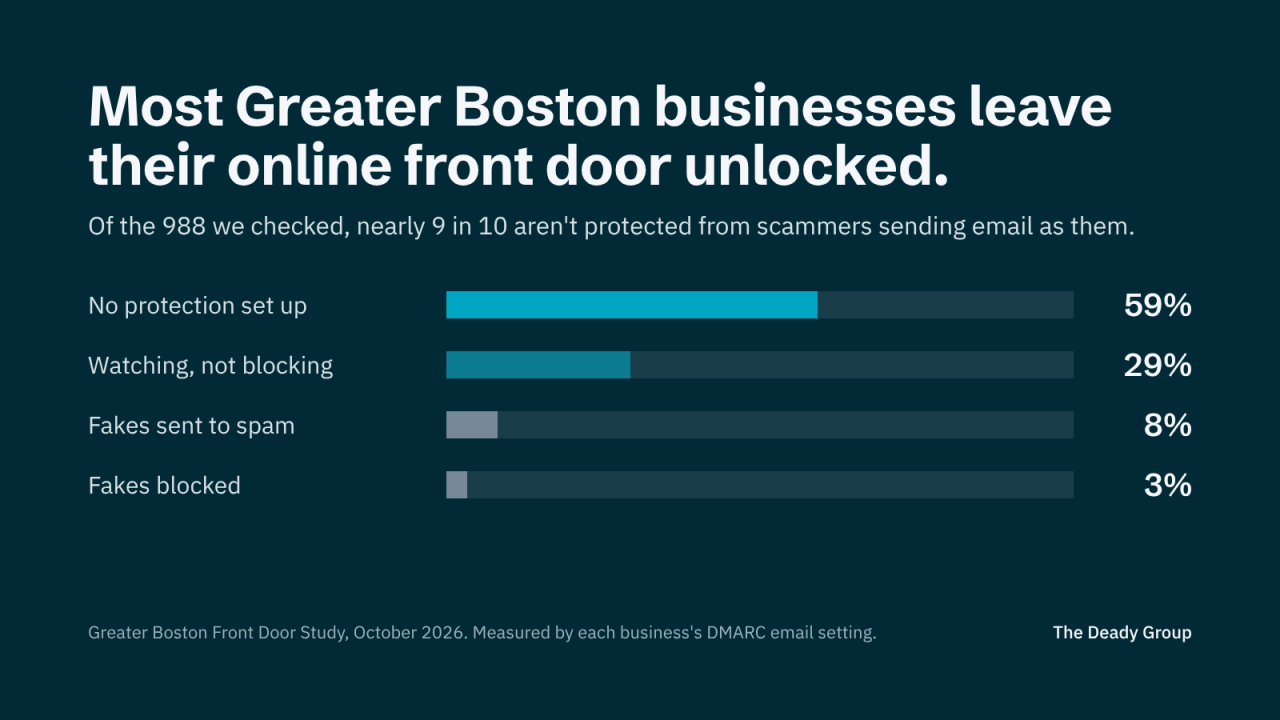
In a 2026 analysis of 5,000 domains belonging to the largest organizations in each U.S. state, Red Sift found that only 38.4% had reached full enforcement. Another 29.1% were set to monitor only, which reports impersonation but doesn't block it. And just over 10% had no DMARC record at all.
Those are the largest organizations in each state. Growing companies tend to sit further back. In fact, EasyDMARC's 2026 adoption report found that more than half of Inc. 5000 companies remain at the basic monitoring stage.
The pattern is familiar. The record gets published, but the project stalls before it does its job.
The insight worth remembering: A security control that only watches is a report, not a lock.
What an Outsider Can See in Minutes
None of what follows requires access to your systems. It's all public, so attackers can check it as easily as you can.
Email authentication. SPF and DKIM tell receiving mail servers which senders are allowed to use your domain. DMARC tells them what to do with mail that fails those checks. So a policy of "none" effectively says: deliver it anyway.
Certificates and security headers. An expired certificate puts a browser warning between your business and every visitor. Missing security headers are quieter, but they often point to a site no one's actively maintaining.
Domain registration. Many company domains are still registered to a founder's personal email, a former employee, or a web designer from years ago. When renewal notices go to an inbox nobody reads, a lapsed domain can be registered by someone else, along with any email that's still being sent to it.
Lookalike domains. DMARC protects the domain you own. However, it doesn't stop someone from registering a near match with one letter changed. That's why verification habits matter just as much as configuration.
None of these is a sophisticated attack.
Each one is simply a door left unlocked.
One Message, Several Owners
Consider a distributor here in Massachusetts with roughly $20 million in revenue.
A long-standing customer receives an email from the distributor's accounts receivable address. It includes updated remittance details for an open invoice. The formatting matches, and so does the signature. The domain matches too, because it's the distributor's domain.
The company published a DMARC record two years earlier, during an email migration. However, it was never moved past monitoring, and the reports go to a mailbox no one checks.
So the customer pays. The distributor finds out a month later, when the original invoice goes past due.
Nothing was hacked in the traditional sense. Still, the money's gone, and a customer relationship is now strained.
Now look at who was involved.
The MSP handled the email migration and published the record. Finance owns the customer relationship and the receivables process. Marketing manages the website and the brand. Meanwhile, the domain itself sits in a registrar account the founder opened years ago.
Each party did its part. But no one owned the outcome.
That's the seam.
Why the Midmarket Sits in the Gap
The Fortune 500 has mostly closed this door. EasyDMARC found those companies at 95% DMARC adoption, with more than 80% at an enforcement policy. They've got security teams, procurement discipline, and someone whose job is to notice.
Small and midsized companies usually don't.
Instead, their front door gets assembled over time. An agency built the website. An MSP moved the email. A founder bought the domain. A bookkeeper set up the payment process. And each decision made sense when it was made.
However, no one revisits the whole.
That's why this belongs on a leadership agenda, not only in an IT ticket queue. After all, it touches fraud prevention, customer trust, and brand reputation as much as security.
The insight worth remembering: Attackers don't follow your org chart. They look at the entrance as one thing.
A Practical Lens
Before the month ends, ask:
- Is our DMARC policy set to enforce, or only to monitor?
- If it's monitoring, who's reading the reports, and what's stopping the next step?
- Who receives our domain renewal and certificate expiration notices, and are they still here?
- Is our domain registered to a company account, with auto-renew and registrar lock turned on?
- How would a customer or vendor verify a payment-change request that appears to come from us?
- Who owns the front door as a whole, across website, email, and domain?
The first four take minutes to answer. The last two, however, are worth a conversation with finance and your largest customers.
If the answer to the first question is "monitor," moving to enforcement is usually a staged project. First, confirm every service that legitimately sends mail as your domain. Then tighten the policy. We've also written a plain-language guide to what a DMARC failure means and how to fix it.
Fragmented answers point to a larger issue. The organization may not have a security tool problem.
It has an ownership problem.
Where The Deady Group Fits
This is often where our work begins.
The Front Door Grade is a quick first look. It checks three public signals: email security (SPF and DMARC), HTTPS and security headers, and homepage structured data. It returns a grade in a few minutes, and there's no call required. That said, it's a starting point, not the full public facing picture.
The Digital Presence & Technology Review is the full public picture. It covers eight areas, including the rest of what this issue describes: domain registration, certificates, and DNS, alongside performance, search, and AI visibility. It comes back within three business days as a written report with priorities, rather than a list of everything that could be fixed. It's the same review we conduct for paying clients, and for a limited time, we're providing it at no charge.
When the Review surfaces work, we help organize it. That may mean working alongside your IT team or MSP, or bringing in a vetted specialist for the pieces that need one. Either way, the goal isn't to sell a platform. It's to close the doors that matter first and make sure someone owns them afterward.
Closing Thought
"Don't make it easy for them" is good advice for people.
It's just as true for organizations.
Most businesses have invested in locks for the inside: endpoint protection, backups, training. Fewer have checked what the entrance shows to anyone who looks.
The front door tells customers who you are.
But it also tells attackers how easy it'll be.
If you'd like a Review, send me a DM with the words "front door," or request one here.
P.S. If this issue was useful, forward it to whoever owns your company's email. If you're not sure who that is, that's your first finding.
This issue also ran on LinkedIn, where you can follow Signals & Systems.