Two weeks ago PHP shipped an emergency fix for a bug that can hand a stranger control of a website. I went back to the Greater Boston businesses in our study whose sites show what version they run. The day after the patch, 57 of 60 were exposed. Today most of them are fixed, and I'd bet nobody at those businesses lifted a finger.
It's the other third that should worry you. 19 of those sites sit on a version of PHP so old that no patch exists for it, and when we checked 271 more sites that hide their version, 263 hid it on every page we tried. If your site runs WordPress, the odds say it's in that last group, where nobody outside can see whether it's patched and, if the person who built it has moved on, nobody inside can either.
The stakes aren't abstract. A taken-over site sends spam from your domain, redirects your visitors somewhere else, or hosts someone else's files until your host suspends it. For a restaurant, a law office or a contractor, that's the front door closed during the weeks people are searching for you, plus a cleanup bill. For a company with a vendor agreement it's a harder question: who was supposed to catch this, and what does the contract say?
The Signal
The bug is called php2shell. It's two flaws in PHP, the language behind WordPress and a large share of business websites. On October 21 the PHP project released emergency fixes and rated both critical (PHP security release).
What makes it serious is how little an attacker needs. Wiz, one of the firms that found it, showed that the flaws sit in PHP itself, so a site on an affected version can be taken over remotely with no login. Every PHP release from the past decade is affected by at least one of them.
It didn't stay theoretical. On October 27 CISA added both flaws to its list of vulnerabilities known to be exploited in attacks. Amazon's threat intelligence team says the first attempts hit its honeypots on October 17, four days before the patch existed, and Delft University's threat lab has counted more than 50,000 exploitation requests from over 600 IP addresses in 70 countries.
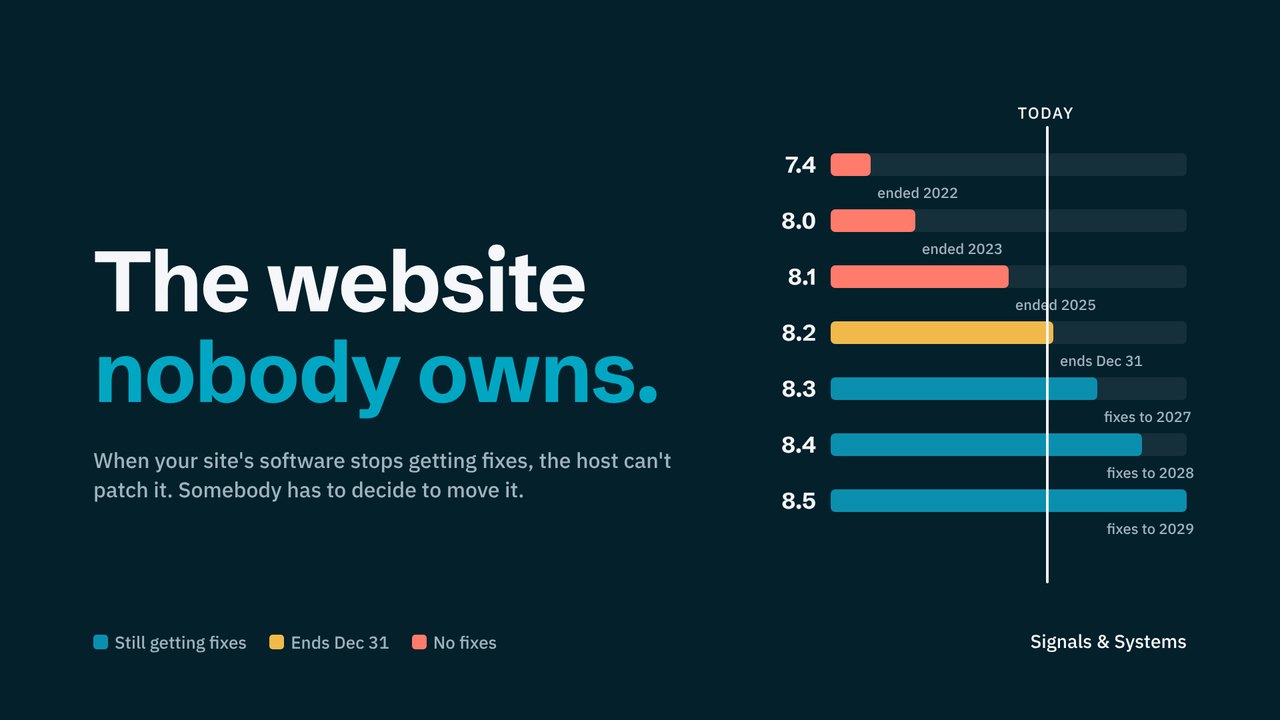
The fixed versions are 8.5.12, 8.4.27, 8.3.36 and 8.2.35. Anything on PHP 8.1 or older gets no fix from the PHP project at all, and on December 31 PHP 8.2 joins that list, which moves another slice of sites into the no-fix column within two months.
What "supported" means, in plain terms. Each PHP version gets about two years of bug fixes, then a year of security-only fixes, then nothing. The day a version drops off that schedule, every bug found afterward stays open on every site still running it. That's where 8.1 and older are now, and 8.2 gets there on December 31. The number to know isn't your version. It's the date your version stops getting fixes, and whether anyone has it on a calendar.
What We Found in Greater Boston
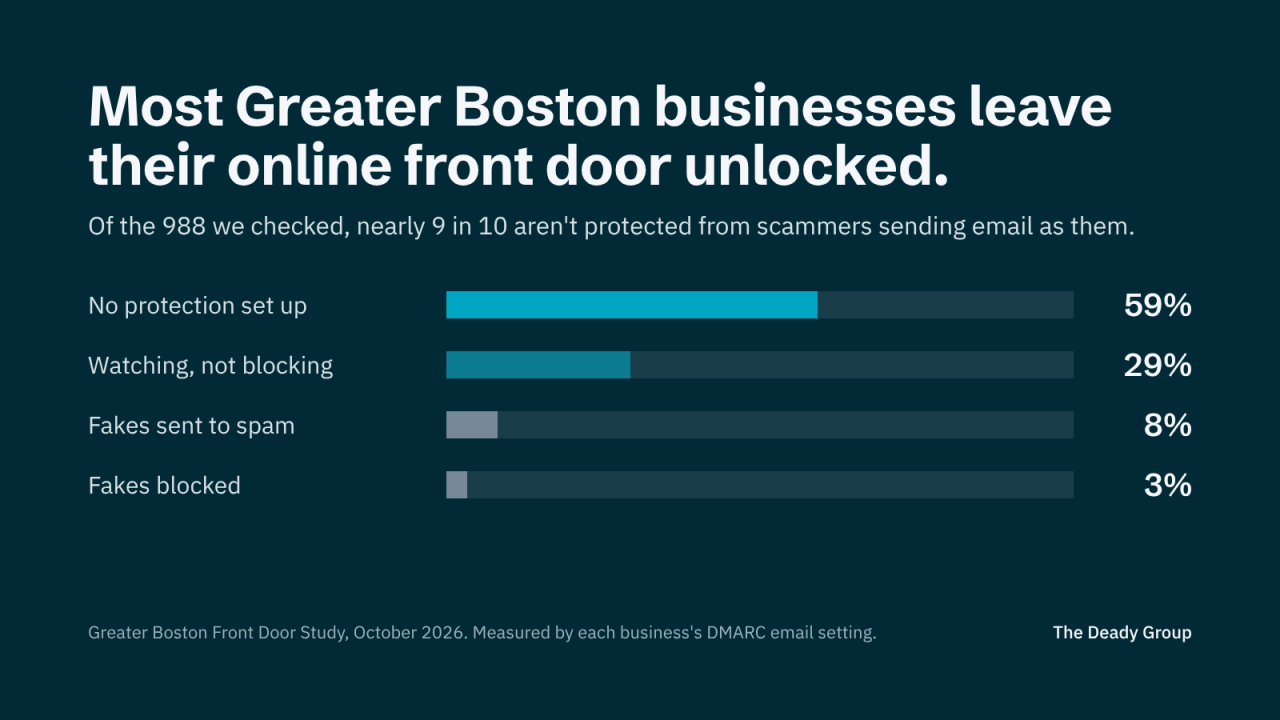
In October we published the Greater Boston Online Front Door Study, a passive look at the websites of 988 independent local businesses. 819 of them loaded normally, and at least 322 run WordPress, which means they run PHP. Only 60 announce which PHP version they're on, so those are the ones we can check from the outside. We checked them the day after the patch and again on November 2.
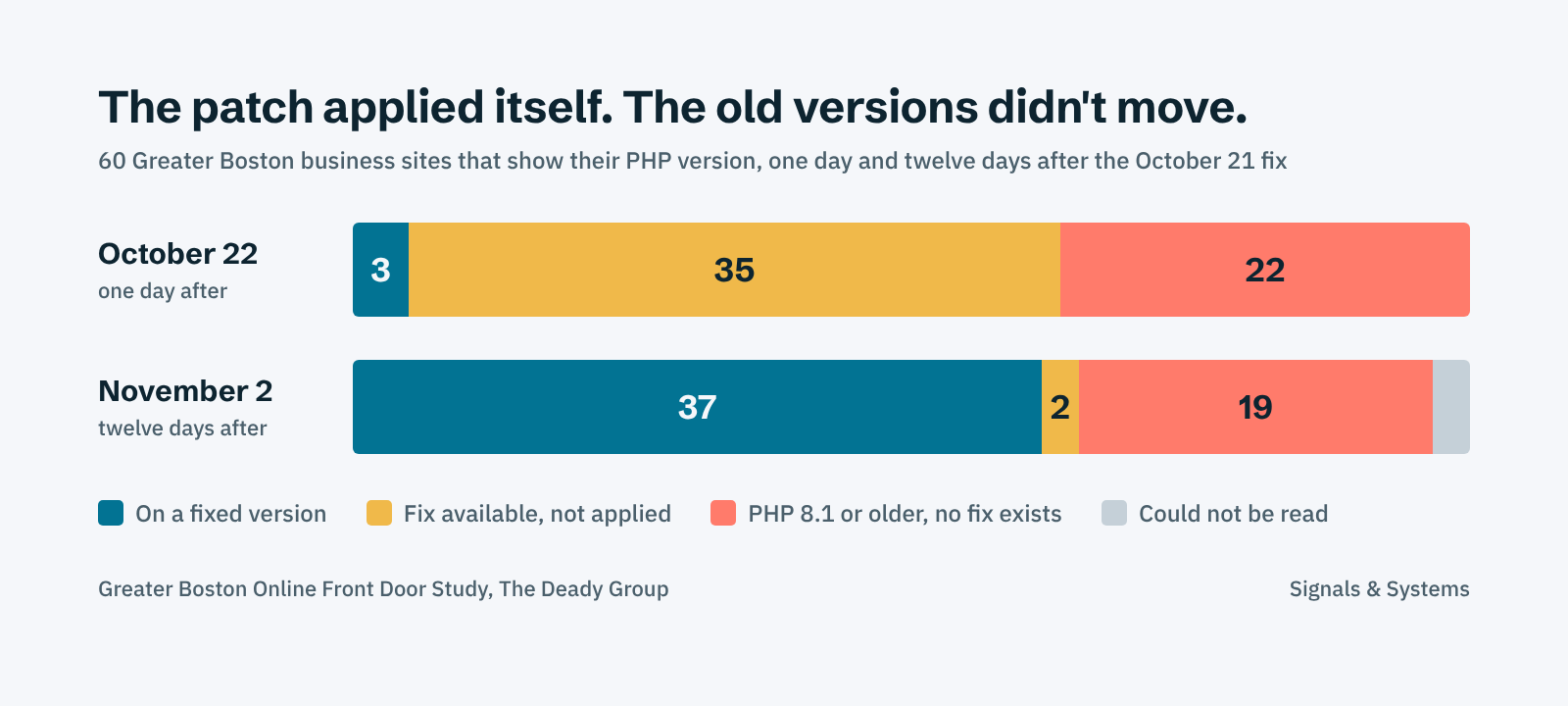
Most of the movement happened on its own. 31 sites went from an unpatched version to a fixed one in under two weeks, and I'd be surprised if more than a handful of those owners ever heard about the bug. Their hosts applied it. That's what a managed host is for, and it's a good argument for paying one.
The 19 are a different story. Three sites did climb off old versions in the same window, so it can be done. The rest didn't, and 10 of them are still on PHP 7.4, which hasn't had a security update since November 2022. They're spread across real estate, finance, auto, law, salons and restaurants, and from the outside each one looks the same. Somebody built it, somebody hosts it, and nobody is responsible for moving it forward.
Insight worth remembering: a security patch is something your host does to your site. A version upgrade is something somebody has to decide about. Most businesses have the first and nobody assigned to the second.
A caveat before anyone panics. These 60 are a small slice, and probably not a typical one, since sites that advertise their version tend to be the less actively managed ones. So on November 2 we looked harder at the other 271 WordPress sites in the study, still from the outside. A homepage is usually served from a cache that never touches PHP, so we read the headers on three pages a cache can't serve: the login page, a search, a missing file. That turned up 8 more. Six are on a fixed release, one is on PHP 8.1 and one is on 7.4. The other 263 hide their version everywhere, which is good housekeeping and tells you nothing about whether they're patched.
Who Owns the Upgrade
Two weeks was long enough to separate the sites with a process from the sites without one. The hosts that apply security releases automatically did their job, quietly. The sites still exposed aren't waiting on a patch. They're waiting on someone to decide who moves the site to a supported version, when, and what it will cost.
For a small business that someone is usually the designer who built the site two years ago and has since moved on, while the host's job ends at keeping the server running. For a larger company it's often a vendor agreement that says "hosting and maintenance" without ever saying what maintenance includes or how fast it happens. Either way the gap looks the same from the outside, and an attacker reads it the same way.
The businesses that come through this fine won't be the ones who reacted fastest. They'll be the ones who already knew who keeps their site on a supported version and how quickly that happens.
Here's my take, after two weeks of watching this play out. Owners treat the website like a finished product, something that was built, delivered and paid for, and the industry lets them. Hosts sell uptime, designers sell launches, and the version underneath belongs to neither. A website is closer to the phone system or the alarm panel: it runs on something that ages, it has a vendor, and it needs one named person who checks the dates once a year. That's a smaller ask than it sounds, and it's the whole difference between the 37 and the 19.
Five Things to Do This Week
None of this takes technical skill. It takes one email to the person who looks after your site.
- Find out what your site runs on. WordPress, Drupal and Joomla all run on PHP, and so do many custom-built sites. If you're on Squarespace, Wix or Shopify, the platform handles this for you and you can stop here.
- Send your host or developer two questions. What PHP version is our site on, and has the October 21 security update been applied? A good partner answers both in a day. If nobody answers, that's your finding.
- If the answer is 8.1 or older, plan the upgrade now. There's no patch coming for those versions. Moving up usually means testing plugins and the theme first, so get it on the calendar rather than waiting for a quiet week.
- Put the response time in writing. If a vendor maintains your site, ask what their turnaround is for a critical security update and whether version upgrades are included or billed separately. That belongs in the agreement, not in someone's head.
- Change the keys if you waited. One of the flaws can expose what's in the server's memory, which may include passwords and API keys. If your site sat unpatched for a while, changing admin passwords and any connected keys is a sensible precaution.
What This Looks Like in Practice
When the news broke, the first site I checked was RevereBeach.com, which we rebuilt this year on WordPress. It was already on PHP 8.4.27, the fixed release, before I went looking. Nobody scrambled and nothing broke.
That wasn't luck. The host applies security releases on its own, and we knew that because we asked before we chose them. The question got answered once, up front, and it's held since.
A good question came up while we were looking into this. Do security headers help here? They don't. Headers tell a visitor's browser how to behave, and they're worth having for other reasons. Hiding your PHP version is good housekeeping too, because it stops a site from advertising that it's behind. However, neither one fixes php2shell. Only the update does.
Questions Worth Asking
- Do I know, by name, who keeps the software under my website on a supported version?
- If a fix came out today, how long would it take to reach my site, and who would tell me it's done?
- When was the last time anyone confirmed what version we're on?
- If my website went down for a week, what would it cost in calls, bookings or orders?
Where The Deady Group Fits
This is the kind of question I work through with clients, usually as the first step of a larger look at how their technology is run. I'll be clear about where I sit, because it matters here: I build and maintain websites for a few clients, so I'm not neutral on who should run yours, and I say so before any recommendation. That's the deal under my Client-First Transparency Standard.
For a reader of this issue, the useful thing I can do is small. I'll check your site from the outside, write down what's visible, and give you the two questions to send whoever maintains it now. If they answer well, you're done, and staying with them is always on the table. If they don't, you'll know what to ask next. Send me your website and I'll do that at no charge.
For the whole online front door, the Digital Presence and Technology Review covers your site, your email security, your listings, and how AI assistants describe you, built from public information only, with the fixes in order.
Closing Thought
This bug sat in PHP for about 14 years. AI helped find it in a single summer, and it'll find the next one faster, as will the people trying to use it. You don't need to follow every headline. However, you do need to know who keeps your site current and how long it takes them.
This issue also ran on LinkedIn, where you can follow Signals & Systems.